Complete Application Package for Sales Agencies
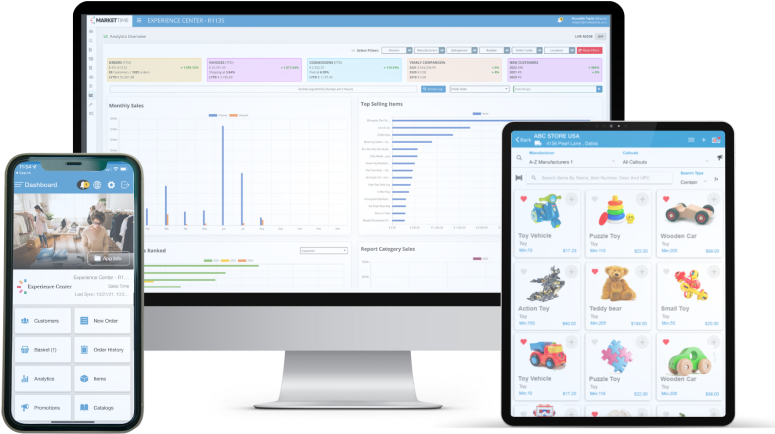
Features & Services
for Sales Agencies and Salespeople
Order Writing Application
Multi-line Rep Groups and Independent Sales Reps can benefit tremendously by creating purchase orders and managing all sales in one place.

Generate Itemized Purchase Orders
Instantly scan or manually key in items. Process multi-line orders in one single experience with your customers and split orders at the end of the sales process.

Scan Purchase Orders on Mobile Devices
Scan barcode labels to process orders faster and efficiently. Have the freedom to work with a handheld device to track customers and generate purchase orders on the road or at trade shows.

Send Orders Electronically to Manufacturers and Customers
Transmit orders securely via multiple send methods of your choice. Also, have the ability to send batch orders.
Customer Management
Manage a full listing of all your retail stores in one place. Have control over salesperson assignments and other critical information for each retail store.

Maintain Retail Stores by Billing and Multiple Shipping Locations
Store and organize all of your customer’s multiple shipping locations per billing, and unlimited contacts per account and more.

View Retail Stores on Google Maps
Within a few clicks, you can view your customers on Google Maps. With the support of Google Business Maps, pin multiple locations to map appointment paths.

Store Manufacturer Account Numbers per BillTo or ShipTo Location
For each customer account created per BillTo or ShipTo, have the fields to store manufacturer account numbers per location.

Securely Store Credit References and Credit Card Details for Reprocessing Orders
To help serve your customers better, have the comfort of adding in your customer’s credit references and credit card details. All information is securely encrypted and PCI Compliant.
Manufacturer Management
Multi-line sales agencies can setup manufacturers on the fly at anytime. Then manage item data to generate purchase orders to transmit to the manufacturers electronically.

Manage and Track All Manufacturer Data
Maintain all of your manufacturer’s information. Set commission percentages, minimum order amounts, expected terms, verified shipping methods, and more!

Import and Share Items with Sales Reps
Utilizing Excel item lists, you can import each manufacturer’s items and share with sales reps to generate multi-line purchase orders on the road or during trade shows.
Territory Management
Sales Agencies can maintain territory Zip Codes to stay organized with Sales Reps and Customer assignments. As well as keep up with precise reporting by regions.

Manage and Track Territory Zip Codes
Generate regions of territories that your Sales Agency covers. Utilize these territories to assign bulk customers to Sales Reps, and most importantly, help filter sales reports by territories.

Assign Customers to Sales Reps by Territory
Assign a range of customers to Sales Reps by territory and MarketTime will manage the newly added customers automatically to the assigned Sales Reps by zip code.
Commission Management
Multi-line Rep Groups benefit tremendously when tracking all your commissions paid in one central location. Have a peace of mind knowing you are getting paid for every order.

Manage Order Commissions and Invoice Data
Track your orders to ensure you are getting paid for each order sent to the manufacturer. Manually enter commissions or import them via Microsoft Excel to speed up the process.

Run Salesperson Commission Statements to Pay
Easily run sales rep commission statements by month for the purchase orders transmitted. Maintain full tracking of orders paid to reps and view outstanding commissions anytime.

Manage Check Logs for Commissions Paid
Track each check received by your manufacturers and manage the dates commissions will be paid per check. Also have quick balance reports to locate discrepancies.
Sales Reports & Analytics
Run various customer, manufacturer, and salesperson reports combined with all your sales or filtered by your specific requirements per report.

View Sales by YTD, Monthly, and Weekly
Run sales reports by any date parameters and also easily compare two date ranges to see how your sales have increased or decreased from the prior period.

Track Item Sales and Top Selling Items
Instantly see your item sales patterns and run reports to see the frequency of sales for each item. Users enjoy seeing item sales and how many orders an item has been sold on.

Export Reports to Excel, Word or Adobe PDF
Take your data anywhere or use it to run your own reports. Easily save any report you run in MarketTime to any of the major editing tools offered.
Import/Export Data
Moving data in and out is crucial to running your business. There are several tools in MarketTime that work for you to help expedite lengthy tasks such as item imports or commission entry.
Import Items via Excel Files
Import item lists given by manufacturers within minutes and have your sales reps see those items. With the ability to import volume pricing, price codes, and size/color/style variables.
Import Commissions via Excel Files
Commission statements that are offered in excel format can be imported into MarketTime. Requirements must be met to have a successful import.

Import Orders via Excel Files
Orders written in other locations can instantly be imported as summary orders or itemized. Requirements must be met to ensure a successful import.

Export Customer Information in any Format
Export customer contact information into excel to help with various marketing processes and have the ability to select only desired fields for export.

Export Purchase Orders in any Format
Export and transmit purchase orders electronically to manufacturers. Have the flexibility to offer any formats to your manufacturers (XLS, TXT, XML, and CSV).
Powering Innovative Sales Agencies MarketTime Solution Overview
Main Office
All agencies must have the main office license as the primary version to operate
- All Features under User Admins
- User Management Capabilities
- Set and Track Commission Rates
- Add/Edit Manufacturers
- Merge Customers Sales History List Icon
- Move Sales Reps Sale History
- Work Offline Anytime
User Admins
Sales agencies can add power admin users to help with operational tasks
- All Features under Salesperson
- Receive discounts and special promotions
- Import Excel Product Lists
- Assign Customers to Sales Reps
- Assign Sales Reps to Manufacturers List Icon
- Manage Territory Zip Codes
- Run Commission Statements
- Import Commission Statements
- Run Commission Balance Statements
- Add & Track Check Logs
- Assign Sales Reps to Territories
- Work Offline Anytime
Salesperson
Complete order-writing system for salespeople, on the road, or at a trade show
- Email/FTP Orders to Manufacturers
- Add/Edit Appointments
- Manage Customer Leads
- Create Call Reports
- Run Monthly and Yearly Reports
- Print Barcode Labels
- Run Appointment Reports
- Work Offline Anytime
Trusted by Leading Companies Everywhere
Meet some of the top brands and sales agencies benefiting from the MarketTime B2B omnichannel commerce platform.